Everything You Need, Nothing You Don't
Every feature built for the way you actually stream — from a dual-engine player to DVR, smart suggestions and family profiles.
Free forever — no credit card required.
A Player That Handles Everything
Dual-engine architecture ensures every stream plays smoothly.
Dual Player Engine
AVPlayer for HLS streams with hardware acceleration. VLC fallback for exotic formats like MKV, AVI, FLV, and more.
Adaptive Bitrate
Automatic quality adjustment based on your connection speed.
Seek Preview
Preview thumbnails while seeking through content.
Speed Control
Playback speed from 0.5x to 2.0x with automatic audio pitch correction.
Video Adjustments
Fine-tune brightness, contrast, and saturation.
Aspect Ratio
Switch between fit, fill, stretch, 4:3, and 16:9 during playback.
Audio Tracks
Select language and codec. Fine-tune audio delay.
Subtitle Customization
Adjust font, size, color, and background. Multiple subtitle tracks.
OpenSubtitles
Search and load subtitles when a stream has none.
External subtitles
Load a subtitle file from your device.
Subtitle styling
Set size, colour and background so they read the way you want.
HDR
HDR streams are detected and labelled.
Chapters
Jump between chapters when a file has them.
Night mode
Levels out loud and quiet passages for late viewing.
Spatial audio
Head-tracked audio on supported AirPods.
HomeKit lights
Your lights follow what's on screen.
Mini player
Keep watching while you browse for something else.
Audio only
Drop the video and keep the sound, for radio and music channels.
Quality selector
Pick a stream quality yourself when you'd rather not leave it to the app.
Gesture controls
Swipe for seek, volume and brightness. Double-tap to skip.
Keyboard shortcuts
Full keyboard control on iPad.
Stream info
See codec, bitrate and resolution while you watch.
Control lock
Lock the controls so a stray tap doesn't interrupt.
Playback queue
Line up what plays next without interrupting what's on.
Scene summary
ProAsk what you missed without spoiling what's ahead.
Seven ways to connect, one app
Xtream Codes, Stalker Portal, M3U URL, M3U file, Plex, WebDAV and local files. Apple TV supports Xtream Codes, Stalker Portal and M3U.
7 ways to connect
Xtream Codes, Stalker Portal, M3U URL, M3U file, Plex, WebDAV and local files. Apple TV supports Xtream Codes, Stalker Portal and M3U.
Encrypted credentials
Stored in the iOS Keychain on your device, protected by your passcode and Face ID. Never kept in plain text.
Custom EPG URL
Override the default EPG source per provider.
Seamless Switching
Switch between providers instantly.
Group Visibility
Show or hide entire channel groups per provider.
Plex
Connect a Plex server and browse its libraries.
Trakt
Scrobble what you watch to your Trakt account.
Network shares
iOS onlyPlay from SMB and WebDAV shares on your network.
Provider lock
Put a PIN on a provider to keep it out of reach.
Language groups
Group channels by language and hide the rest.
Custom channel groups
Build your own groups and order them how you like.
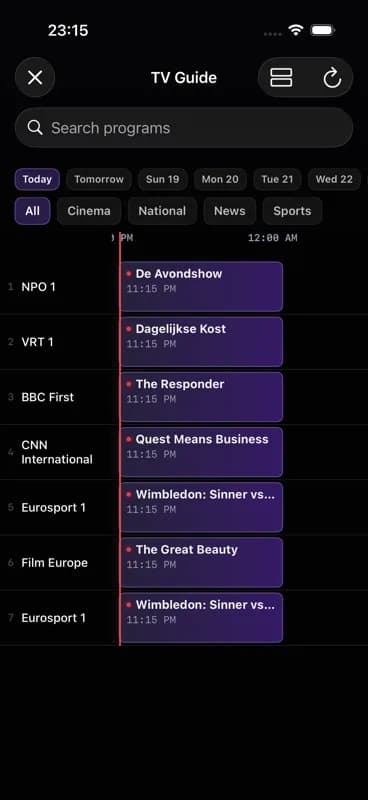
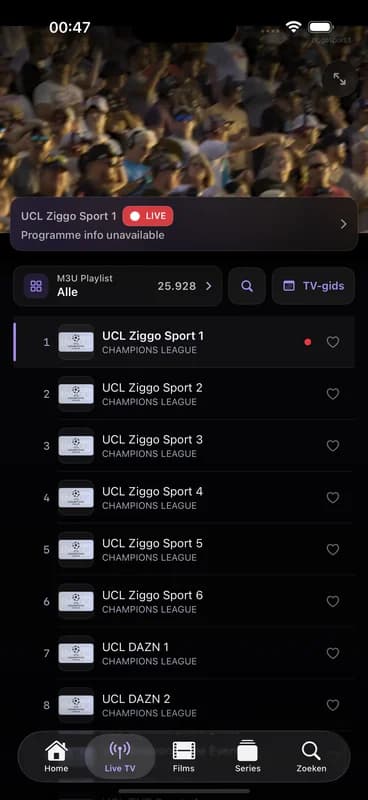
Live TV, with the guide built in
Ten days of listings, catch-up and reminders.
Catch-up
Go back up to three days in the guide and watch what you missed.
Timeshift
Pause live TV and pick it back up where you left off.
Sports centre
Fixtures and results for the teams you follow.
Programme reminders
Get a notification before a programme starts.
Manual guide matching
Fix a channel with the wrong listings by matching it yourself.
Channel zapping
Flick through channels without leaving the player.
Zaplist
A short list of the channels you actually watch.
Search the guide
Find a programme across every channel and day.
Intelligent Viewing Experience
Features that make streaming effortless.
Skip Intro
Duration-based intro skipping jumps past the opening of each episode with a single tap.
Auto Next Episode
Seamless episode transitions. Next episode starts automatically.
Still Watching Check
After 3 hours of playback, asks if you're still watching.
Sleep Timer
Set a duration and fall asleep knowing playback stops.
Instant Replay
Quick 10-second rewind to catch what you missed.
Ambient Glow
Subtle ambient light effect for immersive viewing.
Record, Download, Watch Offline
Never miss a show.
Live Recording
ProiOS onlyRecord a live channel to your device. Records one program at a time.
Scheduled recording
ProiOS onlySchedule a recording from the guide. Keep the app open while it runs.
Offline Downloads
PlusiOS onlyDownload movies and episodes to watch offline. Pro: unlimited.
Smart Auto-Download
ProiOS onlyAuto-download next episode on WiFi when 80%+ watched.
Download queue
iOS onlyQueue several titles and track their progress.
Offline Progress
iOS onlyWatch progress preserved for downloaded content.
Series recording
ProiOS onlyRecord a whole series, not one episode at a time.
Recording library
ProiOS onlyYour recordings in one place, with storage use in view.
Watch Multiple Streams at Once
Split view, PiP, and casting to any screen.
Split view
ProiOS onlyTwo streams side by side on iPhone and iPad.
Quad Grid
Four streams simultaneously in a grid.
Picture-in-Picture
Keep watching in a floating window.
AirPlay
Stream to Apple TV and AirPlay devices.
Chromecast
PlusCast to any Chromecast device.
External Players
ProiOS onlyOpen streams in VLC, Infuse, or other players.
Personalized for Everyone
Separate profiles for every family member.
Multiple Profiles
Free: 1 profile, Pro: up to 6.
Kids Mode
PIN-protected kids profiles with content restrictions.
Parental Time Limits
Set max daily watch time per profile.
Individual Lists
Each profile has their own watchlist, favorites, and history.
Profile Avatars
Customizable avatars for each profile.
Family sharing
ProShare a Pro plan with up to six people.
Face ID lock
Lock the app behind Face ID or Touch ID.
Find What to Watch Next
Smart recommendations and organization tools.
AI Recommendations
ProGenre-weighted algorithm using your history and ratings.
Series tracking
Start watching a series and it's tracked automatically. Get notified when a new episode lands.
Programme guide
Ten days of listings — three back for catch-up, seven ahead for planning.
Favorite Tags
PlusOrganize favorites with custom tags.
Watch History
Timeline history with resume. Free keeps 7 days, Pro keeps everything.
Full-Text Search
Search across all providers.
Trending
What's popular across your catalogue, ordered by TMDB.
Search by actor
Find someone and see everything they're in.
Rate what you watch
Like or dislike a title and the recommendations follow.
Viewing report
See where your watching time actually went.
Taste setup
Pick a few favourites and start with useful suggestions.
Trailers
Watch a trailer before you commit.
Sort and filter
Order by year, rating or when it was added.
Watchlist
Park a title for later.
Deeply Integrated with Apple
Built specifically for Apple platforms.
iCloud settings sync
PlusYour preferences follow you across devices. Watch progress and history sync through your account.
Handoff
Start on iPhone, continue on Apple TV.
Spotlight Indexing
Search content from iOS Spotlight.
Home Screen Widgets
Continue watching widget on your home screen.
30 languages
The interface is available in 30 languages.
Deep Linking
Direct links to content.
Background Refresh
iOS onlyProvider sync and episode checking in the background.
Device management
See where you're signed in and sign a device out.
Backup and restore
Export your setup and put it back on a new device.
Speed test
Check whether the connection can carry the stream.
Data usage
Track how much data streaming costs you.
Diagnostics
Readable diagnostics for when something won't play.
Live Activities
iOS onlyWhat's playing, on the Lock Screen and Dynamic Island.
Siri shortcuts
iOS onlyAsk Siri to open a channel or resume watching.
Radio channels
Audio-only channels get a player built for them.
See it with your own provider.
Free plan, no credit card. Try Pro free for 7 days.
Free forever — no credit card required.